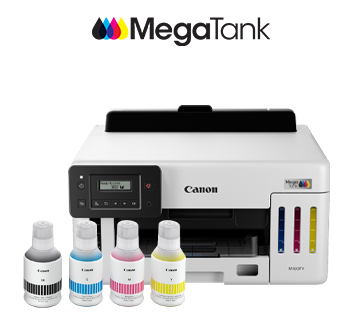
MAXIFY GX5170
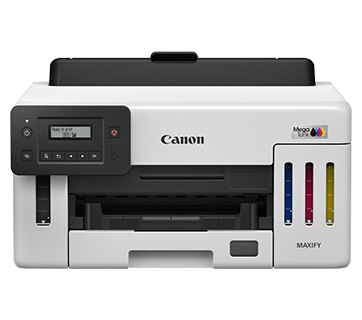
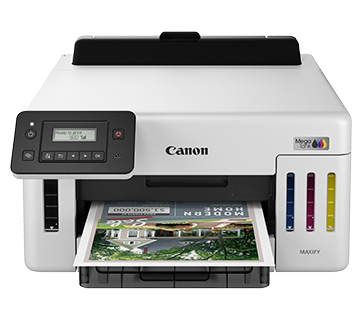
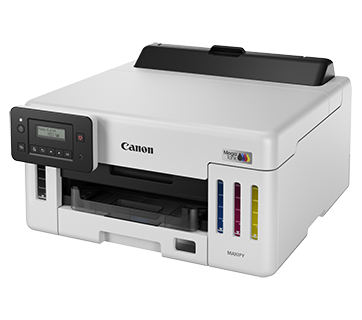
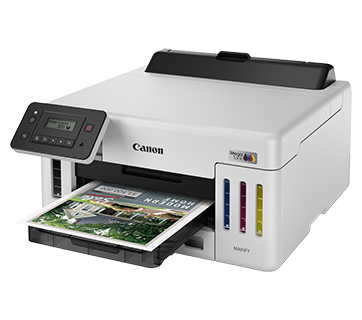
MAXIFY GX5170
MegaTank for Business – High Performance for High Volume Printing
The MegaTank GX5170 combines blazing print speeds with high-intensity pigment inks for next-generation printing performance. Productivity features in automatic 2-sided printing and a high capacity paper cassette are paired with secure network communications to give businesses the edge. Break away from the competition today with Canon MegaTank business printers.
Description
Features
Ultra High Page Yield Ink Bottles
With ultra-high page yield ink bottles that print up to 9,000* pages (mono) and 21,000* pages (colour), perfect for demanding office printing without worrying about ink costs!
*Printed in Economy mode.
Water Resistant Documents
High density pigment ink produces laser printer-like colour intensity. Text and images stay pristine when in contact with water-spills.
Print Double-sided Documents with Ease
Print on both sides effortlessly and get more done with less paper.
Compact Workhorse with a Small Footprint
A small footprint helps the printer fit easily into tight spaces with a front paper output design — perfect for countertops, reception desks, or shelves.
Compatible with a Wide Range of Paper Types
Supports a variety of papers, including stickers, glossy photo paper, long banners, window envelopes, and more — perfect for all your printing needs.
Easy Maintenance
The easy-to-replace maintenance cartridge makes maintenance fuss-free and extends printer lifespan even when printing in high volumes.
Specifications
Specifications
Print
|
Print Head / Consumables |
|
|
Number of Nozzles |
Total 4,352 nozzles |
|
Ink Bottles (Type/Colours) |
GI-76 (Pigment Ink/Black, Cyan, Magenta, Yellow) |
| Maintenance Cartridge | MC-G01 |
|
Maximum Print Resolution |
600 (Horizontal) x 1,200 (Vertical) dpi |
|
Print Speed*1 (Approx.) |
|
|
Document (ESAT/Simplex)*2 |
24 / 15.5 ipm (Mono/Colour) |
|
Document (ESAT/Duplex) |
13 / 10 ipm (Mono/Colour) |
|
Document (FPOT Ready/Simplex)*3 |
5.5 / 7 sec (Mono/Colour) |
|
Print Width |
Up to 206.0 mm (8″) |
Paper Handling
|
Print Margin |
|
|
Bordered Printing |
Envelope (COM10, DL, C5, Monarch): 4 x 6″, 5 x 7″, 7 x 10″, 8 x 10″: Square (127 x 127 mm): Others: |
|
Bordered Auto 2-Sided Printing |
Top/Bottom/Left/Right: 5 mm
|
|
Supported Media |
|
|
Rear Tray |
Plain Paper (64 – 105 g/m²) |
|
Cassette |
Plain Paper (64 – 105 g/m²) |
|
Paper Size |
|
|
Rear Tray |
A4, A5, A6, B5, LTR, LGL, 4 x 6″, 5 x 7″, 7 x 10″, 8 x 10″, Square (127 x 127 mm), Envelope (COM10, DL, [Custom Size] |
|
Cassette |
A4, LTR, A5, B5, Executive [Custom Size] |
|
Auto 2-Sided Printing |
A4, LTR |
|
Paper Weight |
|
|
Rear Tray |
Plain Paper: 64 – 105 g/m² |
|
Cassette |
Plain Paper: 64 – 105 g/m² |
|
Maximum Capacity |
|
|
Rear Tray |
Plain Paper (A4/LTR, 64 g/m²): 100 |
|
Cassette |
Plain Paper (A4/LTR, 64 g/m²): 250 |
Network
|
Protocol |
SNMP, HTTP, TCP/IP (IPv4/IPv6) |
|
TLS |
1.3 / 1.2 / 1.1 / 1.0 |
|
Wired LAN |
|
|
Type |
IEEE 802.3u (100BASE-TX) / IEEE 802.3 (10BASE-T) |
|
Security |
IEEE 802.1X (EAP-TLS/EAP-TTLS/PEAP) |
|
Wireless LAN |
|
|
Type |
IEEE 802.11b/g/n |
|
Frequency Band |
2.4 GHz |
|
Channel |
2.4 GHz: 1 – 13 |
|
Security |
WPA-PSK (AES) |
|
Direct Connection (Wireless LAN) |
2.4 GHz: Available |
Printing Solutions
|
Canon Printing Apps |
|
|
Mobile (iOS/Android) |
Canon PRINT, Easy-PhotoPrint Editor |
|
PC (Windows/Mac) |
Canon PRINT, Easy-PhotoPrint Editor, Easy-Layout Editor (Win only), PosterArtist Lite (Win only), |
|
Mobile/Cloud Printing Solutions |
AirPrint®, Mopria® Print Service, Canon Print Service (Android), Wireless Direct, |
System Requirements
|
OS System Compatibility*6 |
Windows 11 / 10 / 8.1 / 7 SP1, |
General Specifications
|
Operation Panel |
|
|
Display |
2-Line LCD |
|
Interface |
USB 2.0 |
|
Operating Environment*7 |
|
|
Temperature |
5 – 35°C |
|
Humidity |
10 – 90% RH (no dew condensation) |
|
Recommended Environment*8 |
|
|
Temperature |
15 – 30°C |
|
Humidity |
10 – 80% RH (no dew condensation) |
|
Storage Environment |
|
|
Temperature |
0 – 40°C |
|
Humidity |
5 – 95% RH (no dew condensation) |
|
Quiet Mode |
Available |
|
Acoustic Noise (PC Print)*9 |
|
|
Plain Paper |
49 dB(A) |
|
Power Requirements |
AC 100 – 240 V, 50/60 Hz |
|
Power Consumption (Approx.) |
|
|
OFF |
0.05 W |
|
Standby (USB connection to PC) |
0.8 W |
|
Operation (USB connection to PC)*10 |
19 W |
|
Duty Cycle |
Up to 45,000 pages/month |
|
Dimensions (W x D x H) (Approx.) |
|
|
Factory Configuration |
399 x 416 x 238 mm |
|
Output/Trays Extended |
399 x 639 x 332 mm |
|
Weight (Approx.) |
9 kg |
Page Yield*11
|
Plain Paper |
A4 Colour Documents*12: |
- Print speed may vary depending on system configuration, interface, software, document complexity, print mode, page
coverage, type of paper used etc. - Document print speeds are the average of ESAT, based on the Office Category Test (Word, Excel, PDF), the default
simplex
mode, and the ISO/IEC 24734 standard. Click here to find out more. - Document print speeds are the average of FPOT, based on the Office Category Test, the default simplex mode, and
the ISO/IEC 17629 standard. Click here to find out more. - 2.4 GHz and 5 GHz (Wireless LAN IEEE 802.11a/ac/b/g/n) is applicable for Taiwan models only.
- Available with IEEE 802.1X (EAP-TLS/EAP-TTLS/PEAP).
- Please visit https://asia.canon/support to check OS
compatibility and to download the latest driver updates. - The performance of the printer may be reduced under certain temperature and humidity conditions.
- For the temperature and humidity conditions of papers such as photo paper, refer to the paper’s packaging or the
supplied instructions. - Acoustic Noise is measured based on ISO 7779 standard using default settings.
- When printing ISO/JIS-SCID N2 on A4 size plain paper using default settings.
- Page yields may vary depending on content coverage, print settings, temperature, humidity, and frequency of
printing. - Declared yield value is the estimated value based on Canon internal test method using the ISO/IEC 24712 colour
chart, simulating continuous printing with the replacement ink bottles (excluding initial setup). The declared
colour yield is based on composite colour, using Cyan, Magenta and Yellow ink bottles. - The Economy mode reduces the ink consumption by lowering the density. More pages can be printed using this mode.
|
Disclaimer
|