imageCLASS LBP647Cdw
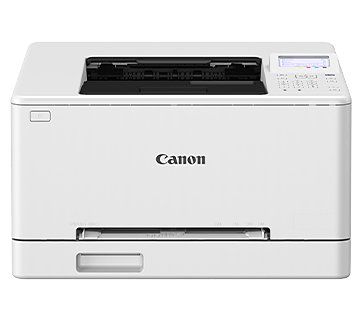
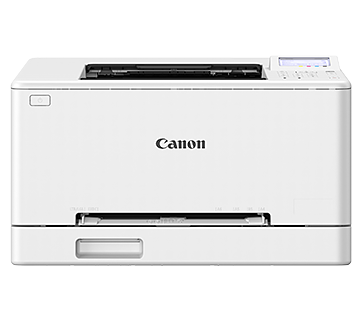
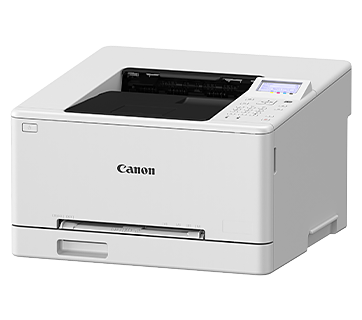
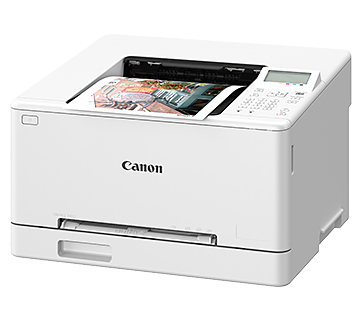
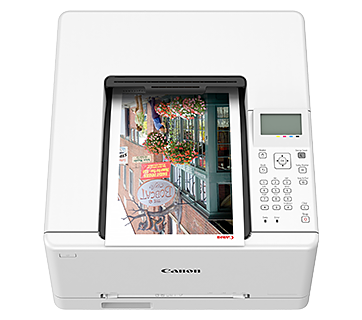
imageCLASS LBP647Cdw
Express Your Ideas with Vivid Colour
With vibrant colour, high print quality and wireless connection, communicate your ideas with the imageCLASS LBP647Cdw.
Description
Features
V² Colour Profile
Create an impactful business document with beautiful colours that complement the razor-sharp quality text. Canon’s V² colour technology delivers vivid and vibrant professional looking printout.
5-line LCD Display
Configure the printer settings easily with the 5-line LCD display. Information can be displayed at a glance, facilitating easy device management and maintenance.
Support Multiple Printing Environments
In addition to Canon’s proprietary UFR II print language, industry standard PCL6 and Adobe® PostScript® 3™ print languages are available for seamless integration with a wide range of business applications.
Auto Duplex Printing
Print two-sided documents to effectively reduce paper usage while lowering carbon footprint and operating costs.
Enhanced Data Security
Safeguard print data against tampering by encrypting communication data with the latest protocol, TLS 1.3 and WPA 3. Monitor system integrity during startup with Verify System at Startup.
Minimal Maintenance
Canon’s all-in-one toner cartridges provide hassle-free, low-maintenance operation. High yield option Cartridge 069H is available to meet high print volume requirement.
Canon PRINT App
With Canon’s latest mobile business solution, you can print and scan documents, photos, web pages and emails all with just one app. Click here to find out more!
Specifications
Specifications
Print
|
Printing Method |
Colour Laser Beam Printing |
|
Print Speed |
|
|
A4*1 (Mono/Colour) |
25 / 25 ppm |
|
Letter*1 (Mono/Colour) |
26 / 26 ppm |
|
2-Sided, A4 (Mono/Colour) |
15 / 15 ipm |
|
Print Resolution |
600 x 600 dpi |
|
Print Quality with Image Refinement Technology |
1,200 x 1,200 dpi (equivalent) |
|
Warm-Up Time (From Power On) |
13 sec or less |
|
First Print Out Time (FPOT) (Approx.)*2 |
|
|
A4 (Mono/Colour) |
10.4 / 10.5 sec |
|
Print Language |
UFR II, PCL 6, Adobe® PostScript® 3™ |
|
Auto Duplex Print |
Yes |
|
Print Margins |
Top/Bottom/Left/Right Margin: 5 mm |
|
Supported File Format for USB Direct Print |
JPEG, TIFF, PDF |
Paper Handling
|
Input Tray Capacity (Plain Paper, 80 g/m²) |
|
|
Standard |
|
|
Cassette |
250 sheets |
|
Manual Feed Slot |
1 sheet |
|
Maximum |
251 sheets (Cassette + 1 Manual Feed Slot) |
|
Output Tray Capacity (Plain Paper, 80 g/m²) |
100 sheets |
|
Media Size |
|
|
Cassette |
A4, A5, A6, Legal, Letter, Foolscap, Indian Legal, Index Card, Note: The cassette may not fully close when loaded with paper longer than A4 size. |
|
Manual Feed Slot |
A4, A5, A6, Legal, Letter, Foolscap, Indian Legal, Index Card, |
|
2-Sided Printing |
A4, Legal, Letter, Foolscap, Indian Legal, Custom (min. 182.0 x |
|
Media Type |
Plain Paper, Recycled Paper, Colour Paper, Bond Paper |
|
Media Weight |
|
|
Cassette |
60 – 200 g/m² |
|
Manual Feed Slot |
60 – 200 g/m² |
Connectivity & Software
|
Standard Interface |
|
|
Wired |
USB 2.0, 10Base-T/100Base-TX/1000Base-T |
|
Wireless |
Wi-Fi 802.11b/g/n |
|
Network Protocol |
|
|
|
LPD, RAW, IPP, IPPS, WSD-Print (IPv4, IPv6) |
|
TCP/IP Application Services |
mDNS, DHCP, Auto IP (IPv4), DHCPv6 (IPv6) |
|
Management |
SNMPv3 (IPv4, IPv6), HTTP/HTTPS, SNTP |
|
Network Security |
|
|
Wired |
IP/Mac Address Filtering, HTTPS, SNMPv3, IEEE802.1X, IPsec, TLS 1.3 |
|
Wireless |
Infrastructure Mode: WPA-PSK(AES), WPA2-PSK(AES), WPA3-SAE(AES), |
|
Mobile Solution |
Canon PRINT app, AirPrint®, Mopria® Print Service, Microsoft® Universal Print |
|
Compatible Operating System*3 |
Windows®, Windows Server®, macOS®, Linux, Chrome OS™ |
|
Other Features |
Department ID, Secure Print |
|
Available Software |
Printer Driver, Toner Status |
General
|
Device Memory |
1 GB |
|
Storage (eMMC) |
2 GB |
|
Display |
5-line LCD |
|
Power Requirements |
AC 220 – 240 V, 50/60 Hz |
|
Power Consumption (Approx.) |
|
|
Operation |
580 W (max. 980 W) |
|
Standby |
12 W |
|
Sleep |
1 W |
|
Operating Environment |
|
|
Temperature |
10 – 30°C |
|
Humidity |
20 – 80% RH (no condensation) |
|
Monthly Duty Cycle*4 |
30,000 pages |
|
Dimensions (W x D x H) (Approx.) |
425 x 418 x 265 mm |
|
Weight*5 (Approx.) |
12.47 kg |
|
Toner Cartridge*6 |
|
|
Standard |
Cartridge 075 BK: 1,400 pages (Bundled: 700 pages) |
|
High |
Cartridge 075H BK: 3,500 pages |
-
Print speed is measured based on internal testing using A4/Letter size
paper printed with 100% print ratio to original on one-sided paper.
Internal testing involved continuously printing the same one page of
content on plain paper. Print speed may vary depending on paper type, paper size
or paper feeding direction. -
First print out time is measured based on internal test procedure and may
vary. When the printer is in the ready state, this is the time from
receiving the print instruction from the controller to printing one sheet
and finishing paper ejection. -
The latest drivers for Windows, Windows Server, Mac OS and Linux can be
downloaded from the https://asia.canon/en/support
website when available. -
Monthly Duty Cycle value provides a means of comparison for product
robustness in relation to other Canon laser printer devices, and does not
refer to actual maximum image output per month. - Excluding toner cartridge.
- Toner cartridge yield is in accordance with ISO/IEC 19798.