PIXMA TS4070
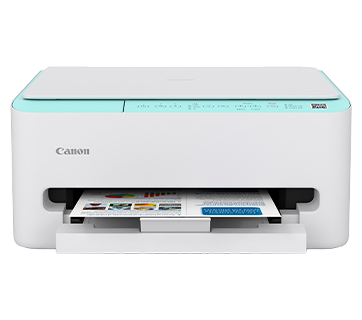
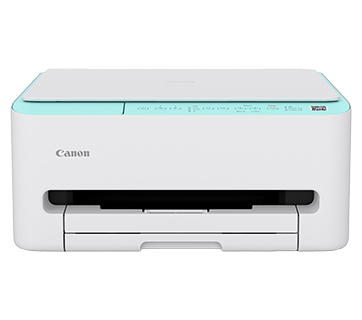
PIXMA TS4070
Compact Wireless All-In-One with Functionality in Style
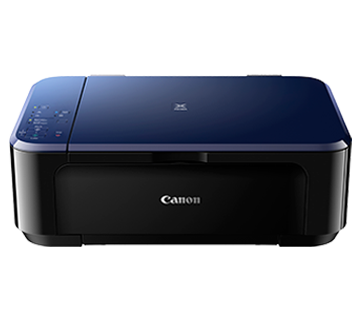
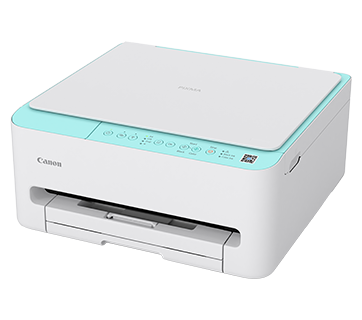
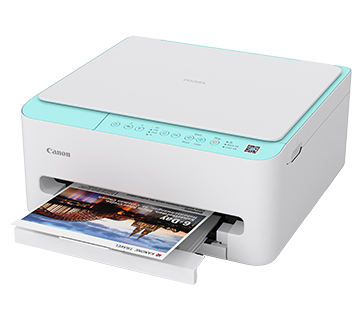
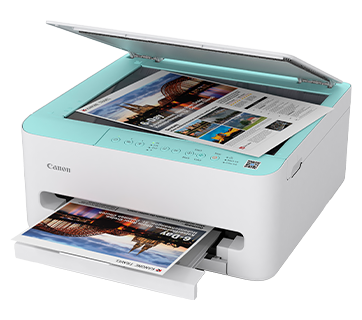
Combining auto 2-sided print performance in an amazingly compact body, this wireless printer brings an invigorating splash of mint-green to jazz up any home and offers hassle-free connection from smartphones.
Description
Features
Compact Design That Fits Anywhere
Compact design with full front access for easy paper handling, ideal for tight spaces.
Auto Duplex Printing
Enjoy increased productivity and convenience with auto duplex printing, allowing you to print on both sides of the paper without manual intervention.
Mobile & Cloud Printing
Print from smartphones, tablets, laptops and cloud storage with the free Canon PRINT and Canon Easy-PhotoPrint Editor apps.
Specifications
Specifications
|
Print Head/Consumables |
|
|
Number of Nozzles |
Total 3,136 nozzles |
|
Ink Cartridges (Type/Colours) |
PG-795 (Pigment Ink/Black) |
|
Maximum Print Resolution |
1,200 (Horizontal)*1 x 1,200 (Vertical) dpi |
|
Print Speed*2 (Approx.) Click here for Summary Report |
|
|
Document (ESAT/Simplex)*3 |
14 / 9 ipm (Mono/Colour) |
|
Document (ESAT/Duplex)*3 |
5.5 ipm (Colour) |
|
Document (FPOT Ready/Simplex)*4 |
7.5 / 9.5 sec (Mono/Colour) |
|
Photo 4 x 6″ (PP-201/Borderless)*5 |
39 sec |
|
Print Width |
Up to 216.0 mm (8.5″) |
Scan*6
|
Scanner Type |
Flatbed |
|
Scanner Technology |
Contact Image Sensor (CIS) |
|
Optical Resolution*7 |
1,200 x 2,400 dpi |
|
Scanning Bit Depth (Output) |
|
|
Greyscale |
8 bit |
|
Colour |
RGB each 8 bit |
|
Maximum Document Size |
|
|
Flatbed |
A4, LTR (216 x 297 mm) |
Copy
Paper
Handling
|
Print Margin |
|
|
Borderless Printing |
Top/Bottom/Left/Right: 0 mm |
|
Bordered Printing |
Envelope (COM10, DL): LTR: 4 x 6″, 5 x 7″, 7 x 10″, 8 x 10″: Square (127 x 127 mm): Custom Size (Width: 89 – 215.9 mm, Length: 127 – 297 mm): Other: |
|
Bordered Auto 2-Sided Printing |
Top/Bottom: 5 mm, Left/Right: 3.4 mm |
|
Supported Media*9 |
|
|
Cassette |
Plain Paper (64 – 105 g/m²) |
|
Paper Size*9 |
|
|
Cassette |
A4, A5, B5, LTR, 4 x 6″, 5 x 7″, 7 x 10″, 8 x 10″, Square (127 x 127 mm), Envelope (COM10, DL) [Custom Size] |
|
Borderless Printing*10 |
A4, B5, LTR, 4 x 6″, 5 x 7″, 7 x 10″, 8 x 10″, Square (127 x 127 mm) |
|
Auto 2-Sided Printing |
A4, LTR |
|
Paper Weight |
|
|
Cassette |
Plain Paper: 64 – 105 g/m² |
|
Maximum Capacity |
|
|
Cassette |
Plain Paper (A4/LTR, 64 g/m²): 100 |
Network
|
Protocol |
SNMP, HTTP, TCP/IP (IPv4/IPv6) |
|
TLS |
1.3 / 1.2 |
|
Wireless LAN |
|
|
Type |
IEEE 802.11a/b/g/n |
|
Frequency Band |
2.4 GHz / 5 GHz |
|
Channel |
2.4 GHz: 1 – 13 5 GHz: W52, W53, W58 |
|
Security |
WPA-PSK (AES) |
|
Direct Connection (Wireless LAN) |
2.4 GHz: Available |
Printing
Solutions
|
Canon Printing Apps |
|
|
Mobile (iOS/Android) |
Canon PRINT, Easy-PhotoPrint Editor |
|
PC (Windows/Mac) |
Canon PRINT, Easy-PhotoPrint Editor, Easy-Layout Editor (Win only), PosterArtist Lite (Win only), |
|
Mobile/Cloud Printing |
AirPrint®, Mopria® Print Service, Canon Print Service (Android), Cloud Integration Service (via smartphone/tablet), Wireless Direct*11 |
System
Requirements
|
OS System Compatibility*12 |
Windows 11 / 10 / 8.1 / 7 SP1, |
General
Specifications
|
Interface |
USB 2.0 |
|
Operating Environment*13 |
|
|
Temperature |
5 – 35°C |
|
Humidity |
10 – 90% RH (no dew condensation) |
|
Recommended Environment*14 |
|
|
Temperature |
15 – 30°C |
|
Humidity |
10 – 80% RH (no dew condensation) |
|
Storage Environment |
|
|
Temperature |
0 – 40°C |
|
Humidity |
5 – 95% RH (no dew condensation) |
|
Quiet Mode |
Available |
|
Acoustic Noise (PC Print)*15 |
|
|
Plain Paper |
47 dB(A) |
|
Power Requirements |
AC 100 – 240 V, 50/60 Hz |
|
Power Consumption (Approx.) |
|
|
OFF |
0.1 W |
|
Standby (USB connection to PC) |
0.9 W |
|
Operation (USB connection to PC)*16 |
15 W |
|
Dimensions (W x D x H) (Approx.) |
|
|
Factory Configuration |
374 x 355 x 168 mm |
|
Output/Trays Extended |
374 x 533 x 168 mm |
|
Weight (Approx.) |
5.2 kg |
Page
Yield*17
- Ink droplets can be placed with a pitch of 1/1,200 inch at minimum.
- Print speed may vary depending on system configuration, interface, software, document complexity, print mode,
page coverage, type of paper used etc. - Document print speeds are the average of ESAT, based on the Office Category Test (Word, Excel, PDF), the default
simplex mode, and the ISO/IEC 24734 standard. Click here to find out more. - Document print speeds are the average of FPOT, based on the Office Category Test, the default simplex mode, and
the ISO/IEC 17629 standard. Click here to
find out more. - Photo print speed is based on the default setting using ISO/JIS-SCID N2 on Photo Paper Plus Glossy II and does
not take into account data processing time on host computer. - TWAIN driver (ScanGear) is based on the TWAIN specification V1.9 and requires the Data Source Manager comes with
the operating system. - Optical resolution scan is available, only when you use TWAIN Driver.
Optical resolution is a measure of maximum hardware sampling resolution, based on ISO 14473 standard. - Copy speeds are the average of sFCOT and sESAT, based on ISO/IEC 29183 standard.
Copy speeds (ADF) are ESAT
of copy in sequence, based on ISO/IEC 24735 standard.
Copy speed may vary depending on document complexity,
copy mode, page coverage, type of paper used etc. and does not take into account warm-up time. - Paper media and sizes listed may not be available in all markets.
- The following media or paper types do NOT support borderless printing: Envelope, High Resolution Paper, T-Shirt Transfer and Photo Stickers.
- Wireless Direct mode is not supported on 5 GHz.
- Please visit https://asia.canon/support to check OS
compatibility and to download the latest driver updates. - The performance of the printer may be reduced under certain temperature and humidity conditions.
- For the temperature and humidity conditions of papers such as photo paper, refer to the paper’s packaging or the
supplied instructions. - Acoustic Noise is measured based on ISO 7779 standard with default settings.
- When copying ISO/JIS-SCID N2 (printed by inkjet printer) on A4 size plain paper using default settings.
- Page yields may vary depending on content coverage, print settings, temperature, humidity, and frequency of
printing. - Declared yield value is in accordance with ISO/IEC 24711, using the ISO/IEC 24712 colour chart. Values obtained
by continuous printing. - Declared yield value is in accordance with ISO/IEC 29102, using the ISO/IEC 29103 chart. Values obtained by
continuous printing.
Black ink is not used when printing under this condition. However, a minimal amount of black ink is used for
maintenance purposes.
Disclaimers
-
To maintain optimal printer performance, Canon printer automatically perform cleaning based on its condition.
During this cleaning process, a small amount of ink is consumed, which may include all colours of ink.
[Cleaning function]
The cleaning function helps remove air bubbles or clogs from the print head nozzles,
preventing degradation in print quality or nozzle blockages. - Replacement parts for printers will be available for five years after production is discontinued. Depending on
your model, we may recommend replacing it with a new unit or one that offers similar performance as part of our
maintenance service. In such cases, you may find that supplies or accessories for your model are no longer
available, or that compatible operating systems may change. - To achieve optimal print quality, use the ink within six months of opening.
- Depending on your device, whether it is a computer or a smartphone and its operating system, the estimated ink
level information displayed on your screen may differ from what appears on the printer’s operation panel.
Additionally, some parts of the estimated ink level message shown on the printer may not be visible or may appear
at different times. Canon recommends using the information displayed on the printer’s operation panel as your
primary reference, noting that this information serves only as a guideline. - Depending on the type of paper and print settings, colour ink may still be used even when you print a monochrome
document. If any colour of ink runs out, you will need to replace the ink cartridge. - For ink cartridge printer, you must install ink cartridges of all colours, regardless of whether you are
printing in monochrome or colour. If any ink cartridges is not installed, an error will occur, and printing will
not be possible. -
When you use the Canon printer for the first time after installing the bundled ink cartridges, the printer
consumes a small amount of ink to fill the nozzles of the print head. As a result, the number of sheets you can be
printed with the initial set of ink cartridges is fewer than the subsequent cartridges. - The printing costs mentioned in the brochures or on the website are based on consumption data from the second
and subsequent ink cartridges, not the first one. - For warranty details, please contact a Canon authorised sales representative in your country or region.
- Ink cartridges sold are generally meant for use with the printers sold in the same region. The ink cartridges
may bear unique labels or configurations and may not be compatible for use with printers sold in another region.
To ensure optimal performance of your printer, please check with your local Canon office or authorised Canon
reseller before relocating your printer from the location of purchase. -
Please be aware that if a problem arises from using non-genuine ink cartridges (including those refilled with
non-genuine ink through methods such as making a hole in the cartridge), a fee will be charged for repairs, even
during the warranty period. Keep this in mind when using non-genuine ink. - Using non-genuine inks may affect the printer’s performance and print quality. In rare cases, where there are no
safety concerns, non-genuine inks can cause the print head to overheat and emit smoke due to the absence of
certain ingredient found in genuine ink.
[Note: This does not apply to usage of all non-genuine inks.]